Blog
AI Noise Cancellation, Explained: What the Label Means on Software (and What It Doesn't)
A buyer's guide to the AI label: what a neural model adds over classic filters, where each vendor says it runs, and a ten-minute test.
AI noise cancellation, on software, means a trained model decides which parts of your microphone signal are voice and turns everything else down, frame by frame, while you talk. It is a real technique, not just a sticker: the better tools in this category do run small neural networks, and they handle changing noise, a dog, a keyboard, a café, far better than the hand-tuned filters that came before. But the label is printed on almost everything now, and it tells you nothing on its own about how well a product works, where your audio is processed, or what it costs. This explainer is for the buyer reading the box. It covers what the word adds, where the processing happens, which products make which claim as of 9 October 2026, and how to test any of them yourself in ten minutes.
Who should read it: anyone choosing between a call app's built-in toggle, a free driver feature and a paid tool, and anyone wondering whether "AI" on a headset box means the same thing as "AI" in a meeting app. Who can skip it: if you only want a ranking, the desk's noise suppression standings give you that directly, with the arithmetic printed.
What "AI" adds over classic suppression
Classic noise suppression is older than the label and still everywhere. It works in three moves. A voice activity detector guesses, moment by moment, whether you are speaking. While you are not, the software listens to the room and builds an estimate of the noise's spectrum, its fingerprint across frequencies. Then it subtracts that estimate from the signal while you are speaking. Jean-Marc Valin, who wrote the open-source RNNoise suppressor, describes the catch plainly on his project page: the hard part is making it work well, all the time, for all kinds of noise, and that takes careful tuning of every knob and many special cases. A steady fan suits classic suppression. A noise that changes, or one that arrives while you talk, does not.
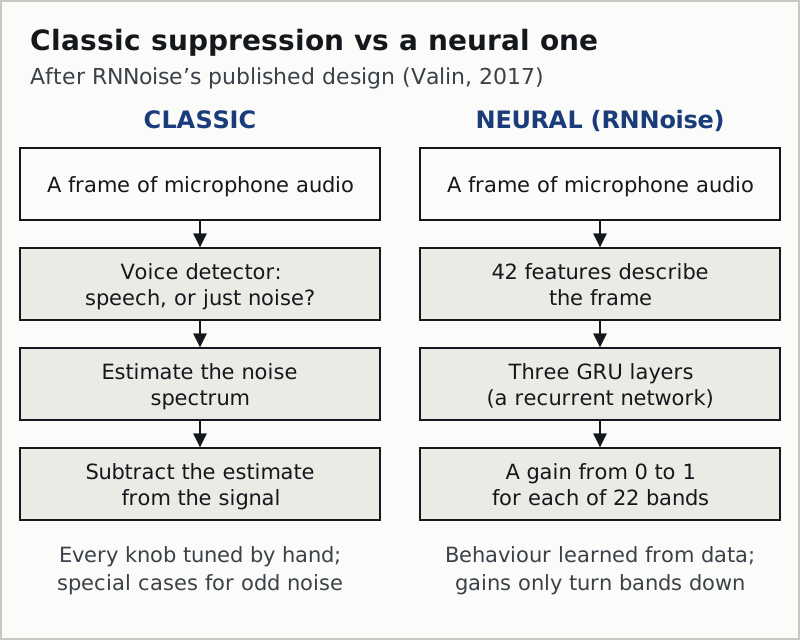
A neural approach replaces the hand-tuned middle with a model trained on examples of speech and noise. RNNoise, published in 2017 and still the default noise filter in OBS Studio, is the clearest public example because its design is documented. It describes each short frame of audio with 42 features, runs them through three GRU layers, a kind of recurrent network that carries memory from one frame to the next, and outputs a gain between 0 and 1 for each of 22 frequency bands. In other words, the network does not invent new audio; it decides how far to turn each band down. Valin reports it running about 60 times faster than real time on an ordinary x86 processor, with a model of 85 kB and no graphics card required.
That last point matters for buyers. "AI" does not have to mean a heavy model or special hardware. RNNoise shows a small network can run on any laptop. Commercial tools use larger, proprietary models, and their vendors publish far less about them, which is why the rest of this page reads their claims rather than guessing at their internals.
What the model does better, and what it still cannot do
Trained models are good at noise that classic filters find hard: sudden sounds, changing sounds and noise that overlaps your speech. They are less good at the one thing they are trained to keep, which is voices. A television, a colleague at the next desk or a podcast playing in the room is speech, and a model built to preserve speech will hesitate to remove it. Some vendors now add a separate feature for exactly this, under names such as voice isolation, which tries to keep one voice and drop the others. Treat it as a different feature from noise removal, because it is.
On-device or cloud: where your voice goes
For live calls, the useful question is not "is it AI" but "where does the model run". A model on your own machine adds no network delay and keeps the raw audio local before your call app sends it anywhere. A model on a server needs your audio to travel there first. For a recording you upload, the second case is normal and expected; for a live call, it would be unusual, and the tools that matter here all say they run locally.
Here is what each vendor says, in its own words, as of 9 and 10 October 2026:
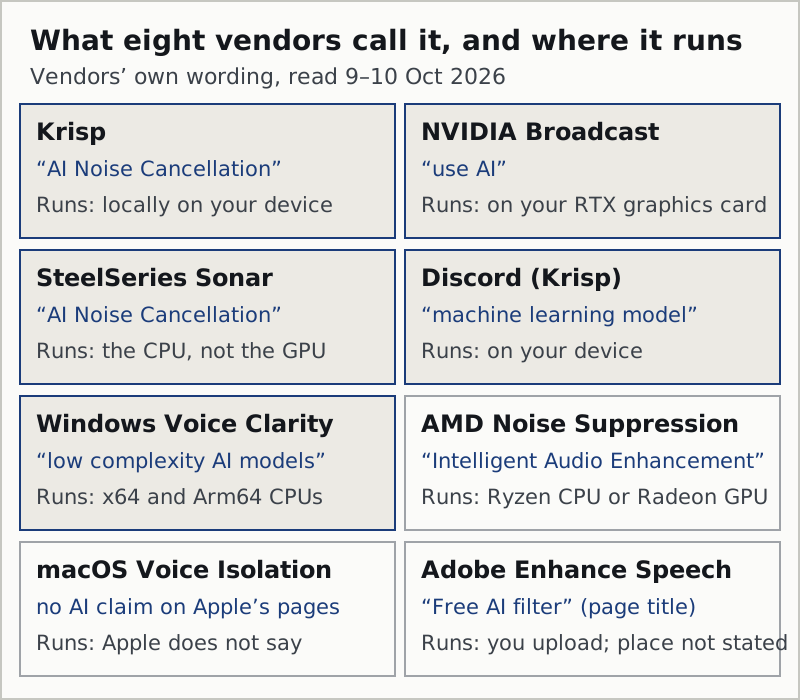
- Krisp says its AI noise cancellation "runs locally on your device". It works on Windows and macOS desktops.
- NVIDIA Broadcast says its Noise Removal and Room Echo Removal "use AI", and it only runs on a PC with at least an RTX 2060 (a Quadro RTX 3000 or TITAN RTX also qualifies): the model lives on your graphics card.
- SteelSeries Sonar calls the feature AI Noise Cancellation and says it uses only the CPU, not the GPU.
- Discord's built-in suppression is Krisp's, and Discord says the machine learning model runs on your device, with no data sent to Krisp's servers.
- Windows 11 Voice Clarity is described by Microsoft as powered by low complexity AI models, supported on x64 and Arm64 processors, on by default, with no extra hardware.
- AMD Noise Suppression is described as "Intelligent Audio Enhancement" and lets you choose whether your Ryzen processor or Radeon card does the processing.
- macOS Voice Isolation: Apple's support pages make no AI claim and do not say where the processing happens.
- Adobe Enhance Speech works on files you upload; its page title calls it a "Free AI filter for cleaning up spoken audio", and Adobe does not say where enhancement is processed.
Two smaller details show how much the wording varies. Zoom's personalized audio isolation keeps an automatic voiceprint on your device, but if you record an optional reference voiceprint, Zoom says that recording is stored by Zoom until you delete it. Microsoft Teams says the voice profile behind its voice isolation is stored on your local device. Same family of feature, different data handling, and both disclosed in a help article most people never open.
How the engine reaches your call app: the virtual driver
A noise cancelling engine that runs on your own machine has to sit somewhere in the audio path, and on a desktop that place is a virtual audio driver. The tool installs a device the operating system lists next to your real microphone; you pick that device in Zoom, Teams or Discord, and the model cleans the signal on its way through. Krisp adds a Krisp Microphone and a Krisp Speaker, the second for incoming audio. NVIDIA Broadcast presents its own virtual microphone, and AMD asks you to select the AMD Streaming Audio Device in your app. A call app's built-in toggle needs no driver, because the app does the work itself. Because a virtual driver sits between your microphone and every program that listens to it, install one only from the vendor's own site; the Krisp download guide walks through what that install changes on Windows and macOS.
Which products use it: the dated list
Not every product with "AI" on the box is equal, and not every product without it is worse. This list sorts the tools this desk follows by what kind of claim the vendor makes, read 9 and 10 October 2026.
- Explicit AI or machine-learning claim, local processing stated: Krisp, NVIDIA Broadcast, SteelSeries Sonar (CPU), Discord's Krisp, Windows 11 Voice Clarity.
- "Intelligent", no AI wording: AMD Noise Suppression, which still runs locally on your Ryzen CPU or Radeon GPU, your choice.
- No AI claim on the support pages: macOS Voice Isolation, and the noise suppression toggles inside Zoom, Teams, Meet and Webex, whose help articles we read describe settings rather than models.
- AI on the label, processing after upload: Adobe Enhance Speech and similar file tools. Correct for recordings, irrelevant during a call.
Notice what the sorting does not tell you: which one sounds best in your room. The desk scores that separately, on the Silence row of its rubric, and the order there does not follow the order of the marketing. Krisp and NVIDIA Broadcast both score 9 out of 10 on Silence; Sonar scores 7; the Krisp review and the Broadcast review show the full ledgers.
How to test the claim yourself
You do not need a lab to check whether a tool's AI is earning its place. You need a quiet ten minutes, your own microphone and a way to record yourself. Most call apps let you record a test meeting, and every desktop has a voice recorder.
- Record a baseline. Thirty seconds of you reading aloud with suppression off, while a fan runs and you type on the keyboard between sentences.
- Record the same thirty seconds with the tool on. Same position, same noise, same text.
- Add a voice. Play a podcast or a television quietly in the room and record again. This is the test that separates noise removal from voice isolation.
- Listen for your own consonants. Aggressive suppression clips the starts and ends of words. If your "s" and "t" sounds go soft, the setting is too high.
- Check you are not stacking. If the call app has its own suppression on as well, turn one off and repeat. Two models on one voice usually sound worse than either alone.
Then read the vendor's documentation for three things, in this order: whether it names where the processing happens, whether it lists hardware requirements that imply local processing, and whether it states its limits. A vendor that answers all three is telling you more than one that only prints "AI-powered". That instinct is what the desk's Candor row on the methodology page measures.
AI noise cancellation vs ANC headphones
The two are often sold side by side and solve opposite problems. Active noise cancellation in headphones is physical: microphones on the earcups hear the outside world, and the headphones play an inverted sound wave into your ear so the two cancel. It protects you from the room. AI noise cancellation in software works on the microphone signal you send, so it protects the people listening to you. A headset can do both, one for each direction, but buying ANC headphones does nothing for what your colleagues hear, and installing suppression software does nothing for the drill next door in your own ears.
This is also why "AI noise suppression vs hardware headsets" is a false choice for most people. A good headset microphone close to your mouth gives any suppressor less noise to remove, and suppression cleans up what the microphone still picks up. They stack well. The primer on noise cancellation covers the vocabulary in more depth.
Edge cases the label hides
A built-in toggle and a dedicated tool at once
Zoom and Teams apply their own suppression by default, and so does Meet on most paid Workspace plans. If a dedicated AI tool is already cleaning your microphone, the call app's filter runs on top of it. Turn the app's level down or off and let one model do the job; the Discord write-up walks through the same problem in one app.
AI that switches itself off
Discord says its Krisp-powered suppression turns itself off when your processor is under very heavy load, to protect voice performance. Any local model competes with whatever else the machine is doing. If suppression seems to vanish mid-game or mid-render, look at CPU or GPU load before blaming the model.
"AI" on a microphone versus in an app
Some hardware advertises AI noise cancellation on its own microphone. That processing happens in the device, and you cannot see or change much of it. It can be excellent or ordinary; the label does not say which, and the same ten-minute test above is the only fair way to compare it with software.
Questions the desk gets asked
What is AI noise cancellation?
It is noise suppression in which a trained model, usually a small neural network, decides how much to turn down each part of your microphone signal, many times a second, keeping speech and reducing the rest. It handles changing and sudden noise better than older filters. It works on what you send, not on what you hear in headphones.
What is AI noise reduction, and is it different?
In practice it is the same idea under a different label. Vendors use noise cancellation, noise suppression, noise removal and noise reduction almost interchangeably for software. What matters more than the word is whether the tool works live during a call or on a file afterwards, and where it processes your audio.
Is AI noise cancelling better than ANC headphones?
They do different jobs. ANC headphones physically cancel sound reaching your ears. AI noise cancelling cleans the microphone signal other people hear. If your problem is that colleagues hear your room, headphones will not fix it; if your problem is that you cannot hear over the room, software will not fix it.
Does AI noise cancellation send my voice to the cloud?
For live calls, the leading tools say no. Krisp states it runs locally on your device, Discord says its Krisp model runs on your device, NVIDIA Broadcast runs on your graphics card and Sonar on your processor. File tools are different: you upload the recording. Apple does not state where Voice Isolation processes audio.
Is AI noise cancellation free?
Often, yes. NVIDIA Broadcast, SteelSeries Sonar, AMD Noise Suppression and Windows 11 Voice Clarity cost nothing, each with a hardware or platform condition. Krisp is the exception, and it is paid: seven days on trial without a card, after which Core runs $8 per user a month when billed yearly, or $16 on a monthly bill (prices as of 9 October 2026).