Rankings · rubric v1
Noise suppression software, ranked: the live-microphone ledger, built-ins included
The best noise suppression software for a live call is Krisp, at 84/100: it scrubs both your outgoing mic and the incoming call audio, on Windows and macOS, in every call app at once, and it costs money after a 7-day trial. The best free option is NVIDIA Broadcast (79) if your Windows PC has an RTX card, and SteelSeries Sonar (74) if it does not. For a recording rather than a call, the ranking changes, and so does the answer.
The short answer
Noise suppression software filters a microphone signal so that speech goes through and the room does not. This desk scores six tools on one published rubric. Three of them work live, during the call. Three work on files after the fact. Ranked within each group, with what "free" means on each row as of 9 October 2026:
| Tool | Score | Works | Platforms | What it costs | |
|---|---|---|---|---|---|
| 1. | Krisp | 84/100 | live | Windows 10 (64-bit) / 11, macOS 14+ | 7-day trial, no card; then Core $8/user/month billed annually ($16 monthly) |
| 2. | NVIDIA Broadcast | 79/100 | live | Windows 10 64-bit, RTX 2060 or better | free |
| 3. | SteelSeries Sonar | 74/100 | live | Windows 10 (RS5+) | free |
| 1. | Adobe Podcast Enhance | 80/100 | files | browser | free tier: 1 hour a day, files up to 30 min / 500 MB |
| 2. | Cleanvoice | 78/100 | files | browser | 30 minutes of credit at sign-up, then paid |
| 3. | Descript | 68/100 | files | desktop editor | free plan: 60 media minutes a month, Studio Sound limited |
If you remember one thing from the table, make it the "Works" column. A file tool cannot help the meeting you are in, however well it scores, and a live tool will not rescue the interview you recorded last week. Choosing the wrong half of this list is the most common mistake in this category, and no score fixes it.
How the desk scores
Every Standard Score on this page comes from the same five-dimension rubric. Each tool gets 0 to 10 on each dimension; the scores are multiplied by fixed weights, summed, multiplied by ten and rounded half-up. The full rubric lives on the methodology page. In one line each:
- Silence (×0.35): how much noise disappears, and how much of the voice survives.
- Toll (×0.20): what it costs your machine and your patience: hardware rules, setup friction.
- Wallet (×0.20): value against price, free tier included.
- Fit (×0.15): platforms covered, and how naturally it sits in a working day.
- Candor (×0.10): how honestly the vendor documents limits, pricing and privacy.
The three live tools, row by row, so you can see where each one wins and loses:
| Dimension | Krisp | NVIDIA Broadcast | SteelSeries Sonar |
|---|---|---|---|
| Silence ×0.35 | 9 → 31.5 | 9 → 31.5 | 7 → 24.5 |
| Toll ×0.20 | 8 → 16.0 | 5 → 10.0 | 8 → 16.0 |
| Wallet ×0.20 | 6 → 12.0 | 10 → 20.0 | 10 → 20.0 |
| Fit ×0.15 | 10 → 15.0 | 6 → 9.0 | 5 → 7.5 |
| Candor ×0.10 | 9 → 9.0 | 8 → 8.0 | 6 → 6.0 |
| Standard Score | 84 | 79 | 74 |
The pattern is the argument. Krisp and Broadcast tie on Silence; Krisp wins on Fit and Toll because it needs no particular hardware and runs on macOS, and loses on Wallet because it is the only one of the three that charges. Sonar matches Broadcast on Wallet, beats it on Toll because its AI runs on the processor, and gives the points back on Silence and Fit.
Real-time picks
These three install a virtual microphone (and, in Krisp's case, a virtual speaker) that sits between your hardware and your call app. You select the virtual device in Zoom, Teams, Discord or wherever you talk, and the cleanup happens as you speak.
Krisp — 84/100, the one that works everywhere
Krisp is the most complete real-time suppressor this desk scores. It cleans both directions: your outgoing microphone through the Krisp Microphone device, and what you hear through the Krisp Speaker device. It also removes nearby background voices and cancels echo, and Krisp's help centre says the noise cancellation runs locally on your device. Supported systems are Windows 10 (64-bit), Windows 11 and macOS 14 onward, and the apps Krisp lists by name include Zoom, Teams, Google Meet, Webex and Slack.
The asterisk is money. Krisp has no free plan. Newcomers can try it for seven days with all premium features unlocked and no card on file; after it, Krisp's terms say access ceases unless you buy. Core is $8 per user a month on an annual bill ($16 if you pay monthly), and Advanced is $15 or $30 on the same terms (krisp.ai/pricing, as of 9 Oct 2026). Live noise cancellation is a desktop feature; the mobile app does not do it for meetings, with one exception: on iOS, outgoing US phone calls placed through the Krisp app get noise cancellation.
NVIDIA Broadcast — 79/100, the free one with a hardware bill
Broadcast is free, and its noise engine ties Krisp's on this desk's Silence row. It adds Room Echo Removal, which is the better answer to a bare room than plain noise removal, and Studio Voice for people with an RTX 3060 desktop card or better. The price is the requirement: at least a GeForce RTX 2060 (or a Quadro RTX 3000 or TITAN RTX), 8 GB of RAM, driver R570 or newer, and Windows 10 64-bit, which is the only operating system NVIDIA lists. There is no macOS build. If that hardware is already in your desktop, Broadcast is the value pick of the whole page.
SteelSeries Sonar — 74/100, the free one without a hardware rule
Sonar's AI noise cancellation (SteelSeries' blog calls it ClearCast AI) works with any headset and any microphone, and SteelSeries says it uses only the CPU, so there is no graphics-card gate. It is free inside the SteelSeries GG suite and runs on Windows 10 (RS5+) only. The design is a gamer's mixer first: separate lanes for game, chat and media, with suppression built in. For a Windows PC without an RTX card it is the free live option that will still install.
For recorded files
If the noise is already part of a recording, a podcast episode, an interview or a lecture capture, the live tools above are the wrong shelf. These three take a file, clean it, and hand it back.
Adobe Podcast Enhance (80/100) is the strongest one-click rescue this desk scores, and its free tier is generous for a solo creator: up to 1 hour of enhanced speech a day, each file capped at 30 minutes and 500 MB, audio only, with no strength control and no bulk upload. Premium lifts the daily allowance to 4 hours, files up to 2 hours and 1 GB, adds video, a strength slider and bulk upload, and Adobe offers a 30-day trial. Adobe's own pages disagree on which plan carries Premium, and no price rendered on a US read on 9 October, so check the current figure on Adobe's page before you budget.
Cleanvoice (78/100) removes background noise, wind, echo and reverb, and it strips filler words in the same pass. You get 30 minutes of credit when you sign up, with no card. That is a sample to judge the result on your own audio, not a recurring free tier; after it, Cleanvoice is paid by the hour.
Descript (68/100) is an editing suite whose noise tool, Studio Sound, is a feature rather than the product. The free plan gives 60 media minutes a month and 100 one-time AI credits, with Studio Sound marked "Limited"; paid plans move to 10, 30 or 40 media hours a month. Score Descript as an editor and it fares better than it does here; nobody should install it only to remove noise.
The free route that never expires is Audacity, an open-source editor for Windows, macOS and Linux that costs nothing. Its Noise Reduction effect (under Effect > Noise Removal and Repair) works in two steps: you first sample a stretch of pure room noise as the profile, and then run the reduction across the full recording. It is slower and more manual than the three above, and it costs nothing.
The suppression you already own
Before installing anything, check what is already on the machine. Every major call app ships its own suppression, both major desktop operating systems now carry one, and AMD bundles one with its graphics driver. None of them is scored here, because they are features rather than products, but each of them is free and each is worth one honest call before you spend money.
| Built-in | Where to find it | The limit |
|---|---|---|
| Zoom | Settings > Audio > Microphone modes > Noise removal, then set the Background noise suppression dropdown (Auto, Low, Medium or High) | works inside Zoom only; Zoom warns High may raise CPU use |
| Microsoft Teams (desktop) | Settings > Devices > Noise suppression, a single on/off toggle (on by default); voice isolation with a voice profile | Teams only; the Auto/Low/High levels exist only on iOS |
| Google Meet | More options > Settings > Audio > Noise cancellation | on desktop, paid Workspace editions and Google One 2 TB+; free on most Android phones |
| Webex | Webex smart audio: Noise removal, Optimize for my voice, Optimize for all voices, Music mode | Webex only |
| Discord | User Settings > Voice & Video > Noise Suppression > Krisp | Discord only; Macs need Apple silicon and macOS 12+ |
| Slack huddles | Preferences > Audio & video > Microphone > noise suppression | huddles only |
| Windows 11 Voice Clarity | automatic, on by default, on any x64 or Arm64 Windows 11 PC | only in apps that use Windows' communications mode, and only when the PC maker's driver does not do its own |
| macOS Voice Isolation | the Video menu-bar item > Mic Mode > Voice Isolation, in FaceTime and other apps that support Mic Modes | Apple names only FaceTime; options vary by app |
| AMD Noise Suppression | AMD Software: Adrenalin Edition > Settings > Audio & Video; select "AMD Streaming Audio Device" in your app | Ryzen 6000-series with integrated graphics or Radeon RX 6000-series desktop cards and newer; Windows 10 or 11 |
The AMD entry deserves a sentence of its own, because it is the closest thing on the list to a dedicated tool: AMD says it works on input and output devices and lets you choose whether the Ryzen processor or the Radeon card does the work. Its requirements were read from amd.com on 10 October 2026: Adrenalin Edition 22.7.1 or newer, and AMD notes it may not install alongside Realtek ACP-based noise reduction.
If you stream, OBS Studio's Noise Suppression filter offers three engines: RNNoise (the default, better quality, more CPU), Speex, and NVIDIA Noise Removal, which needs NVIDIA's Broadcast SDK and an RTX card. That belongs to the streaming desk more than the meeting desk, and a filter chain you assemble yourself is not something this rubric scores.
When does a built-in stop being enough? When you need the same behaviour in every app, when the noise is on the far end of the call rather than yours, or when the app's one toggle is not strong enough for your room. Those are the three cases the dedicated tools above exist for.
Free noise suppression software: what "free" means on each row
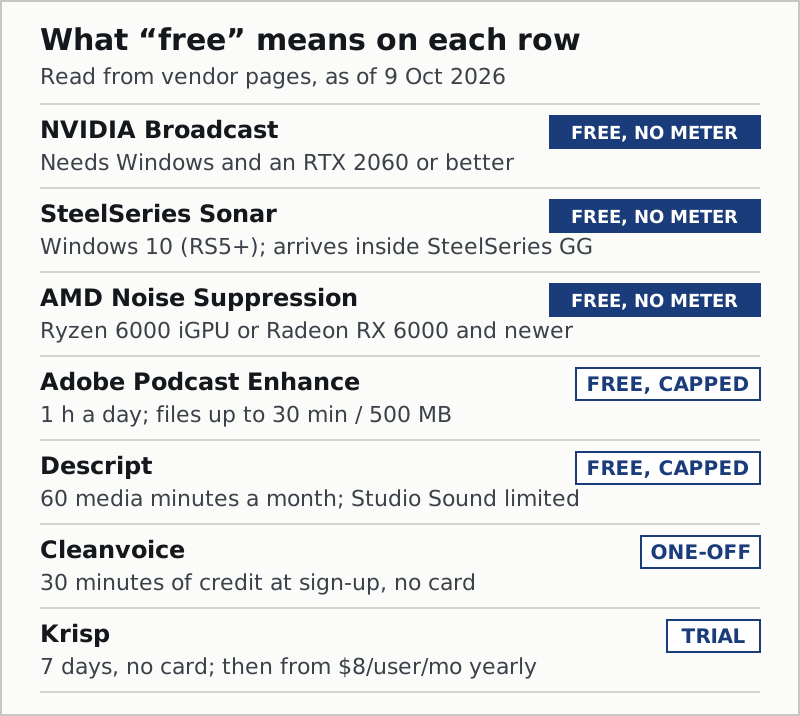
Four different things are sold as free in this category, and they deserve different amounts of trust.
Free with no meter. NVIDIA Broadcast, SteelSeries Sonar and AMD Noise Suppression never run out. Each has a gate instead: an RTX card on Windows for Broadcast, Windows for Sonar, recent AMD silicon for AMD. If you pass the gate, the price really is zero.
Free with a cap. Adobe Podcast Enhance meters out an hour a day, with a 30-minute, 500 MB ceiling per file; Descript gives 60 media minutes a month. The cap resets, so for light use these are genuinely free; for a weekly two-hour show they are samples.
A one-off credit. Cleanvoice's 30 minutes arrive once, at sign-up. That is enough to hear what it does to your own voice and not enough to run anything on.
A trial. Krisp is seven days with every feature and no card, and then it is paid. It is the only one of the four shapes that ends with the tool switching off.
The best free noise suppression software, then, depends on what you already own. With an RTX card in a Windows PC, it is Broadcast. On any other Windows PC, Sonar or, with recent AMD hardware, AMD's own. On a Mac, it is macOS Voice Isolation, which costs nothing and is already installed, with Krisp as the first paid step. For recordings, Adobe's free tier, with Audacity as the slower route that never asks for anything.
On Linux, none of the three live tools above installs: Krisp builds for Windows and macOS, Broadcast and Sonar for Windows. The free route there is open source. NoiseTorch-ng creates a virtual microphone for PulseAudio or PipeWire and filters it with RNNoise, the same open model behind OBS’s default filter. noise-suppression-for-voice packages RNNoise as a plugin (LADSPA, LV2, VST and more) to load into PipeWire or an audio host. Easy Effects, a PipeWire effects rack, lists RNNoise noise reduction and a DeepFilterNet “deep noise remover” among its effects. All three are GPL-licensed and unscored here; their project pages were read on 25 October 2026.
Live or recorded: choosing in one pass
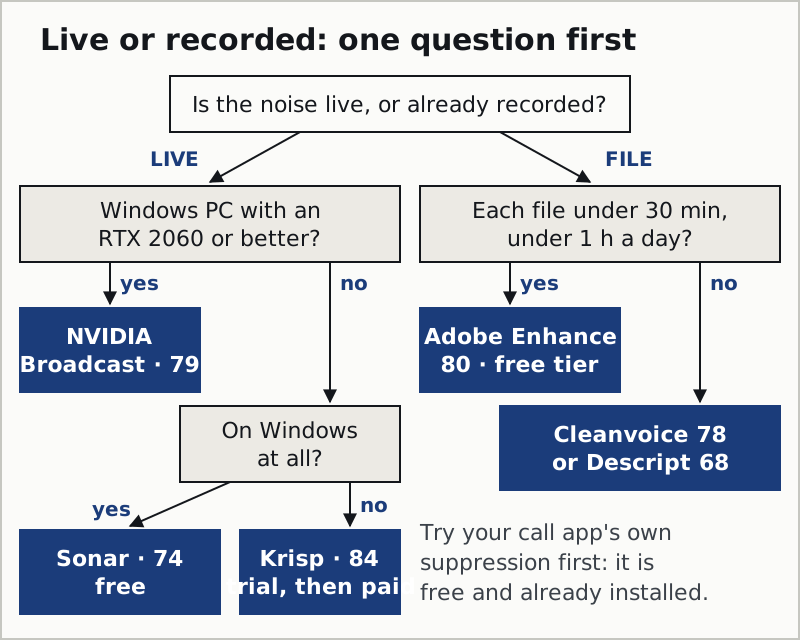
The flow leaves out one honest shortcut: on a Windows machine without an RTX card, Krisp is also an option, and the right one if you need macOS too, both directions cleaned, or one setting for every app. Sonar is the free route there; Krisp is the paid route that does more.
What noise suppression means, in one paragraph
Noise suppression is real-time filtering of a live microphone signal: software listens to what the microphone captures, separates speech from everything else (fans, keyboards, traffic, a second voice) and sends only the speech on to the call. "Noise cancellation" is the older word and, in headphones, means something physical: an inverted sound wave played into your ear. In software the two words are used interchangeably, and this page uses "suppression" for the live, in-call case. The post-production cousins clean a recording after the fact, and they sit in the second half of the table above. Our primer on noise cancellation settles the vocabulary in full.
Edge cases the rankings do not cover
Two filters on one voice. If Krisp, Broadcast or Sonar is cleaning your microphone and Zoom or Teams is also suppressing, two models are working on the same signal, and the result often sounds thinner than either alone. Use one: turn the app's own suppression down or off when a dedicated tool is in front of it.
The noise is somebody else's. Your suppression cleans what you send. If a colleague's microphone is the noisy one, only incoming-audio cleanup helps: Krisp's speaker-side cancellation, or SteelSeries' "team noise" reduction in Sonar. Built-in toggles do not reach the other end.
A locked work laptop. Many companies block installing virtual audio devices. In that case the built-in tier is not a fallback but the whole menu: your call app's suppression and, on Windows 11, Voice Clarity in apps that use it.
Echo, not noise. A hard, bare room produces reflections that plain noise removal leaves behind. Broadcast's Room Echo Removal and Krisp's echo cancellation are aimed at that; for a recording, Adobe Enhance removes "noise and echo" and Cleanvoice lists echo and reverb.
Questions we actually get
- What is the best noise suppression software?
- On this desk's rubric, Krisp at 84/100 for live calls: two-way cleanup, Windows and macOS, every call app, after a 7-day trial. For recordings, Adobe Podcast Enhance at 80/100. NVIDIA Broadcast (79) is the free live pick for RTX owners on Windows.
- What is the best free noise suppression software?
- NVIDIA Broadcast if your Windows PC carries an RTX 2060 or better, SteelSeries Sonar on any Windows 10 (RS5+) PC, and AMD Noise Suppression on recent AMD hardware. On a Mac, the free option is macOS Voice Isolation. Krisp is not free: it is a 7-day trial, then a paid plan.
- What is real-time noise suppression software?
- Software that cleans your microphone while you speak, before the audio reaches the call. Krisp, NVIDIA Broadcast and SteelSeries Sonar on this page all work in real time by installing a virtual microphone that you select in your call app. File tools such as Adobe Enhance and Cleanvoice do not.
- Do Zoom and Teams already have noise suppression?
- Yes. Zoom offers Auto, Low, Medium and High background noise suppression, and the Teams desktop app has a single noise suppression toggle. Both are free and worth trying first; dedicated software earns its place when you need one setting in every app or cleanup of incoming audio.
- Are noise suppression and noise cancellation the same thing?
- In software, nearly. Both words describe filtering unwanted sound out of a microphone signal, and "suppression" usually labels the live, in-call case. In headphones, noise cancellation means something physical: an inverted sound wave played into your ear.
- Is there free noise suppression software for Linux?
- Yes, and it is open source. NoiseTorch-ng adds an RNNoise-filtered virtual microphone on PulseAudio or PipeWire, and Easy Effects offers RNNoise and DeepFilterNet noise removal for PipeWire. Krisp, NVIDIA Broadcast and SteelSeries Sonar have no Linux version.