Reviews · scored on rubric v1
SteelSeries Sonar review: ClearCast AI, ChatMix and the Windows-only catch — 74/100
SteelSeries Sonar is good, and for one buyer it is the obvious install: a Windows gamer who wants a free mixer and noise suppression in one place. It scores 74/100 on the Standard's rubric. The sharpest limitation is scope, not sound: Sonar runs on Windows 10 (RS5+) and nothing else, so Mac owners and console players can stop reading here. Everyone else should read the ledger before the hype.
In brief: the score and the sharpest limitation
Seventy-four is a respectable number with a narrow audience. Sonar earns full marks on Wallet because it costs nothing and asks for no SteelSeries hardware. It earns an eight on Toll because its noise suppression runs on the processor rather than demanding a graphics card. It loses the most ground on Fit, where a Windows-only tool built around game chat scores five, and on Candor, where SteelSeries' marketing says more than its documentation does.
Is SteelSeries Sonar worth it? If you are on Windows and you already spend evenings in Discord, yes, and the price makes the question almost rhetorical. If your working day is meetings on a laptop, the answer is "probably not as your only tool": the software was designed for a different room. If you are on a Mac, there is nothing to weigh, because there is no Mac build.
Sonar costs nothing and asks nothing of your headset. It asks everything of your operating system: Windows, or nothing at all.
What Sonar is: a mixer first, a noise filter second
Sonar is the audio suite inside SteelSeries GG, the company's companion software. Read it as three tools sharing one window. The first is a mixer: it splits your PC's sound into separate virtual devices for game, chat, media, aux and microphone, so the balance between your teammates and the explosions is a slider rather than a guess. SteelSeries calls that balance ChatMix and describes it as letting you "adjust the balance between your game and chat sound". The second is an equaliser, a parametric EQ that SteelSeries pitches at amplifying or reducing specific in-game sounds. The third is the part this desk scores hardest: AI noise cancellation on the microphone.
Because Sonar works by creating virtual devices, using it means pointing your apps at them. In Discord, for example, SteelSeries' own setup guide has you choose "SteelSeries Sonar - Chat" as the output and "SteelSeries Sonar - Microphone" as the input. That design is powerful (every app gets its own lane) and fragile (an app that resets its device choice quietly falls out of the mix). It also explains why the suite feels heavier than a single-purpose suppressor. You are installing an audio routing system, and the noise filter rides along inside it.
Streamer Mode extends the same idea for people who broadcast: it adds a "Sonar Stream" source so streaming software can take one pre-mixed feed. That is useful, and it underlines the point. Sonar's centre of gravity is the gaming desk, and every feature, from the spatial audio SteelSeries advertises to the per-game EQ presets, is aimed there.
ClearCast AI on any microphone: what SteelSeries says it does
The noise feature goes by two names. SteelSeries' own how-to blog calls it ClearCast AI noise cancellation; the Sonar product page simply says "AI Noise Cancellation". Whichever label you meet, the documented facts are the same, and they are few enough to list in full:
- Any headset, any mic. SteelSeries' guide says that "all headsets are compatible" and that "it doesn't matter what headset you use". No SteelSeries hardware is required, which is the single most useful fact on the page.
- It runs on the CPU. The same guide says it draws on the processor alone and leaves the graphics card idle. That is the structural difference from NVIDIA Broadcast, which will not run at all without an RTX card.
- Three intensities. You switch it on in Sonar's Microphone section and choose Minimal, Medium or Maximum.
- Your team, too. The product page promises to "reduce team noise without even having to ask", which reads as processing on the chat audio you receive as well as the microphone you send.
What the documentation does not give you is just as important. SteelSeries publishes no figure for how much processor time ClearCast costs at each intensity, no list of the noise types it was trained on, and no statement about whether the incoming-audio cleanup is the same model as the outgoing one. The guide that carries the CPU and compatibility details dates from November 2022, and the product page has moved on in its wording since. This desk does not run an acoustics lab and will not invent a benchmark to fill those gaps; the gaps are why Candor sits at six.
The practical reading: ClearCast is a competent, free, CPU-based suppressor that will take a fan, a keyboard or a housemate's television down a level. On suppression alone the desk scores it behind Krisp and NVIDIA Broadcast, both of which earn nine on Silence to Sonar's seven. Your own room settles the rest, and Sonar's price makes that test free.
Cost: free, Windows-only, and what you hand over
On 9 October 2026, Sonar's page offers a "Free Download" and shows no paid tier, subscription or premium unlock. That is the whole money story, and it is why Wallet is the only column on the ledger filled to the top.
"Free" still has a price list. Here is what Sonar actually asks for:
| What you hand over | What it means in practice |
|---|---|
| Windows 10 (RS5+) | The only platform SteelSeries lists. No macOS, no Linux, and no Xbox or PlayStation. |
| The SteelSeries GG suite | Sonar is not a standalone download; it arrives inside GG, with the rest of that software. |
| Processor time | ClearCast runs on the CPU. Maximum intensity on a busy laptop is where you would notice. |
| Device housekeeping | Every app has to be pointed at the right Sonar device, and kept pointed there. |
| An account? | SteelSeries doesn't list an account requirement for Sonar; the desk makes no claim either way. |
Those are real costs, and none of them is money. For a gaming PC that already runs GG because of a SteelSeries mouse or headset, the marginal price is close to nothing. For a work laptop that has never heard of SteelSeries, installing a gaming suite to clean one microphone is a lot of furniture for one lamp.
The ledger, in public
Every Standard Score is the same arithmetic: five dimensions, fixed weights, rounded half-up. The methodology page holds the rubric. This table holds Sonar's entry.
| Dimension | Score | Points | Why |
|---|---|---|---|
| Silence ×0.35 | 7/10 | 24.5 | ClearCast cleans the mic and, per SteelSeries, team audio; it trails the two leaders |
| Toll ×0.20 | 8/10 | 16.0 | CPU-only, so no graphics-card rule; the GG suite comes along with it |
| Wallet ×0.20 | 10/10 | 20.0 | free, no paid tier, no SteelSeries hardware required |
| Fit ×0.15 | 5/10 | 7.5 | Windows 10 (RS5+) only, and designed around game chat first |
| Candor ×0.10 | 6/10 | 6.0 | the product page outruns the documentation; no CPU-cost figures |
| Standard Score | 74/100 | weighted sum ×10, rounded half-up (rubric v1) |
Where the points went: 74.0 earned, 26.0 forfeited. Fit gave up 7.5 of its 15, Silence 10.5 of its 35, Candor 4 of its 10 and Toll 4 of its 20. Read that line as the case against the score as much as the case for it.
- Silence earned 24.5 of 35.0
- Toll earned 16.0 of 20.0
- Wallet earned 20.0 of 20.0
- Fit earned 7.5 of 15.0
- Candor earned 6.0 of 10.0
- Forfeited 26.0 of 100
Sonar beside the other live options
Sonar is one of three tools this desk scores that clean a call while it is happening. The other two are NVIDIA Broadcast (79/100) and Krisp (84/100), and the useful comparison is not "which is best" but "which one can you actually run".
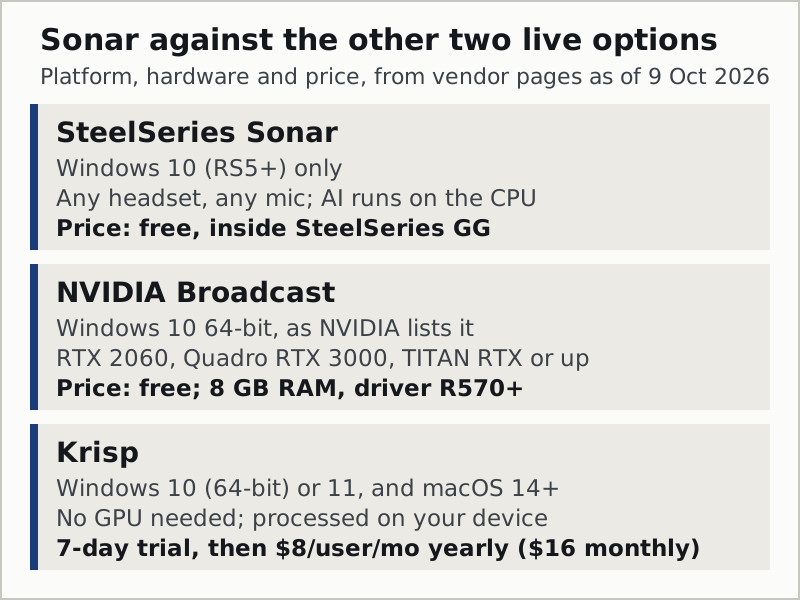
| SteelSeries Sonar | NVIDIA Broadcast | Krisp | |
|---|---|---|---|
| Standard Score | 74/100 | 79/100 | 84/100 |
| Platforms | Windows 10 (RS5+) | Windows 10 64-bit (NVIDIA's listing) | Windows 10 (64-bit) / 11, macOS 14+ |
| Hardware rule | none; any headset and mic | an RTX 2060 or above (Quadro RTX 3000 and TITAN RTX qualify), plus 8 GB RAM | none; no GPU |
| Where the AI runs | your CPU | your RTX graphics card | your device (Krisp says processing is local) |
| Incoming audio | SteelSeries says it reduces "team noise" | not stated on NVIDIA's app page | yes, via the Krisp Speaker device |
| Price, 9 Oct 2026 | free | free | 7-day trial, no card; then Core $8/user/month billed annually or $16 monthly |
Read the table from the bottom row up. Two of the three are free, and both of those are Windows-only, so a Mac user's comparison ends before it starts. Between the two free options, the deciding question is the graphics card: with an RTX 2060 or better, Broadcast scores higher and adds room-echo removal; without one, Sonar is the free option that still runs. Krisp is the paid step, and the one that works on a Mac, on a work laptop with integrated graphics, and in front of every call app at once.
What Sonar does not do
Search engines send a long tail of very specific questions to this page, and most of them have short answers. Here they are in one place.
| People ask | The answer, from SteelSeries' own pages |
|---|---|
| Does Sonar work on Mac? | No. Windows 10 (RS5+) is the only platform listed. |
| Does it work on Xbox or PlayStation? | No; it is PC software. |
| Do I need a SteelSeries headset? | No. "Any headset, any mic." |
| Does ClearCast need a graphics card? | No. SteelSeries says it uses only the CPU. |
| Is there a Sonar subscription? | None shown on the Sonar page as of 9 Oct 2026. |
| Can I run it without the GG app? | No; Sonar ships inside SteelSeries GG. |
| Does it clean recordings after the fact? | No. It processes live audio; a saved file needs a post-production tool. |
Who should skip it
Skip Sonar if you are on macOS; there is nothing to install. Skip it if your machine is a managed work laptop where installing a gaming suite will raise eyebrows, or simply will not be permitted. Skip it if your day is meetings rather than matches: the mixer's game, chat and media lanes are a solution to a problem a spreadsheet-heavy calendar does not have. And skip it if you already own an RTX card and only need suppression, because Broadcast scores five points higher for the same price.
The case for keeping it is just as clear. A Windows gamer who wants one free install for Discord nights, the odd daytime stand-up and a better balance between game and voice will not find a better-value tool on this desk's ledger.
Edge cases the product page skips
Two suppressors on one voice. If Sonar's ClearCast is on and Discord's own Krisp suppression is also on, two models are processing the same microphone. Pick one. Discord's version is free inside Discord and runs on-device, so on a Discord-only evening it is a reasonable choice; Sonar's makes sense when the same cleaned mic feeds several apps.
The meeting app ignores Sonar. Zoom and Teams have their own noise suppression, and both default to it. If you route Sonar's microphone into Zoom, the call is filtered twice. Either lower Zoom's Background noise suppression level or switch ClearCast off for meetings.
A laptop that runs hot. ClearCast runs on the processor. On a thin laptop already busy with a game, Maximum intensity is the setting most likely to cost you; try Medium first and judge by the result in your own room, since SteelSeries publishes no CPU figure.
Audio vanishes from one app after an update. Sonar works through virtual devices. A meeting client or game update that resets its audio device to the physical headset will drop out of Sonar's mix without warning. Re-select the "SteelSeries Sonar" device in that app.
Questions we actually get
- Is SteelSeries Sonar good?
- Yes, for the buyer it was built for. On this desk's rubric it scores 74/100: full marks on value, a solid eight on system cost because its AI runs on the CPU, and five on fit because it is Windows-only and designed around game chat. For meetings on a laptop, it is serviceable rather than first choice.
- Is SteelSeries Sonar worth it?
- It costs nothing, so the real question is whether it is worth the install. On a Windows gaming PC, yes: you get a mixer, an EQ and AI noise cancellation for free. On a Mac it cannot be installed, and on an RTX-equipped PC that only needs suppression, NVIDIA Broadcast scores higher at the same price.
- Does SteelSeries Sonar work without a SteelSeries headset?
- Yes. SteelSeries says Sonar is happy with whatever headset or microphone you own, and that ClearCast AI noise cancellation is compatible with all headsets. No SteelSeries hardware is required.
- Is SteelSeries Sonar free?
- Yes. As of 9 October 2026 Sonar is a free download inside SteelSeries GG, and its page shows no paid tier. The costs are non-financial: Windows 10 (RS5+) only, the GG suite installed alongside it, and processor time for the noise filter.
- Is Sonar worth turning on, or should I leave the noise filter off?
- Turn ClearCast on if your microphone picks up fans, keys or people in the room, and start at Medium. Leave it off if Discord's or your meeting app's own suppression is already doing the job, because two filters on one voice usually sound worse than either one alone.